Panel interviews on video: what candidates notice
A candidate meets four strangers in a grid and has to work out who's who while being assessed. How to make a video panel feel organized from the start.

Think about a panel interview from the candidate’s side. They join a call, and four people appear. Each tile shows a first name, maybe. One person is from engineering, one from product, one is the hiring manager, one is from another team entirely. The candidate has to work out who’s who, remember it, and pitch their answers to the right person, all while being assessed.
Most candidates won’t say anything about it. They’ll just form an impression of the company, and it often isn’t “organized.”
What candidates are trying to work out
Within the first minute, a candidate wants answers to a few questions:
- Who’s the hiring manager? That’s who they’ll report to, and who they most need to connect with.
- What does each interviewer do? An answer pitched at an engineer lands differently with a designer.
- Why is each person here? Is this the culture round, the technical round, the leadership round?
- What’s this person’s name, again? So they can address people directly and follow up afterwards.
On a video call, the screen answers almost none of these. Names are often first names or nicknames, titles don’t appear at all, and the panel’s structure has to be explained out loud.
What it costs you
Interview time is short. Every minute spent on “and I’m on the platform team, I work with…” is a minute not spent assessing the candidate, or letting them assess you.
It also shapes how the company comes across. A panel where everyone appears the same way, with name, role and team on screen, reads as a company that has its act together. A panel of mismatched tiles reads as four people who were pulled into a meeting.
And it matters most for the candidates you most want: experienced people with options, who are interviewing you as much as you’re interviewing them.
How to run a clearer panel
A few habits help, whatever tools you use.
- Send the panel in advance. The invitation should list each interviewer with their role and what they’ll cover. Candidates prepare better and arrive less anxious.
- Agree on one opener. The hiring manager introduces the panel in a single sentence each, then hands over. No round of self-introductions.
- Fix display names. Everyone on the panel uses their full name, in the same format, in their meeting app profile.
- Put role and team on screen. So the candidate doesn’t have to remember who said what, and can address people by name.
- Keep the same look for every stage. The screening call and the final round should look like the same company.
Put name, role and team on the video
The step that makes the biggest difference is the fourth: a nametag on each interviewer’s video, showing their name, role and company.
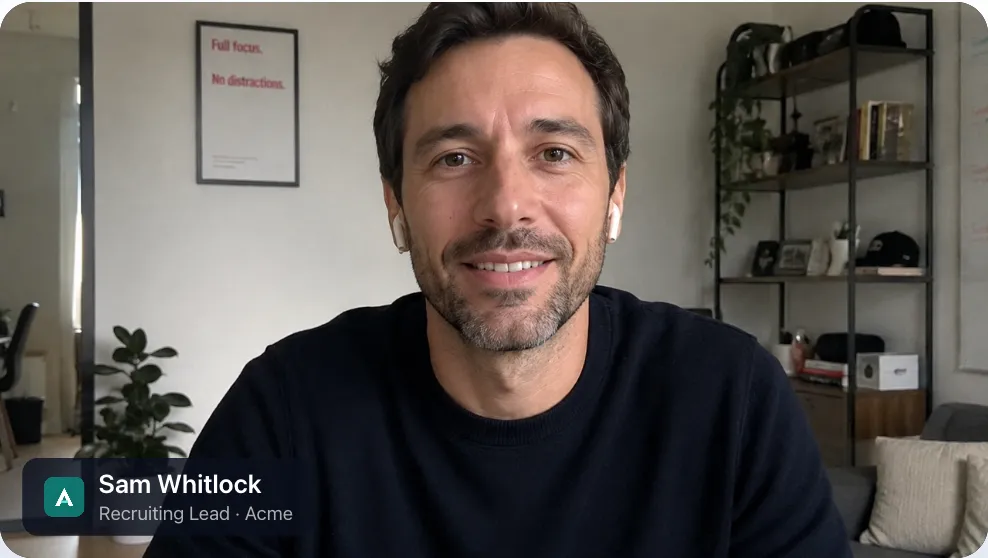
With Nametags, each interviewer’s tag appears on their camera in every meeting app: Zoom, Teams, Google Meet or Webex, whichever the candidate’s invitation uses. For a recruiting team, the parts that help most:
- Roles from the directory. SSO field mapping fills in titles and departments from your identity provider, so interviewers’ tags are accurate without anyone typing.
- The employer brand on every call. The logo and company name are locked for everyone, so the screening call and the final round look the same.
- A group for interviewers. A Recruiting group in People and groups can have its own rules, such as showing the department so candidates can see which team each interviewer is from.
If your interviews run on Zoom, the Nametags Zoom app is the quickest start: it fills in your tag from your Zoom profile, with nothing else to install.
Try it before your next panel
Ask the next panel you’re on to set up their tags beforehand, skip the round of introductions, and see how quickly the interview gets to the questions that matter. If you’re responsible for a recruiting team, Day one is a video call covers what happens after the offer, and our 30-day pilot plan works just as well for a recruiting team as for sales.


