Your video calls are your biggest unbranded channel
Companies brand every website, deck and email signature, then spend thousands of hours a week on camera as a grid of faces. Here's what that costs.
'%3e%3crect%20x='42'%20y='58'%20width='216'%20height='148'%20rx='10'%20fill='%23fff'/%3e%3ccircle%20cx='178'%20cy='112'%20r='24'/%3e%3cpath%20d='M132%20206c4-36%2022-52%2046-52s42%2016%2046%2052'/%3e%3crect%20x='58'%20y='172'%20width='58'%20height='20'%20rx='5'%20stroke-width='5'%20stroke-dasharray='2%2011'%20/%3e%3cpath%20d='M150%20206v34M112%20246h76'/%3e%3c/g%3e%3c/svg%3e)
Think about everything your brand team controls. The website has a design system. Decks start from a template. Email signatures are generated from the directory. A trade show booth goes through three rounds of review before anyone builds it.
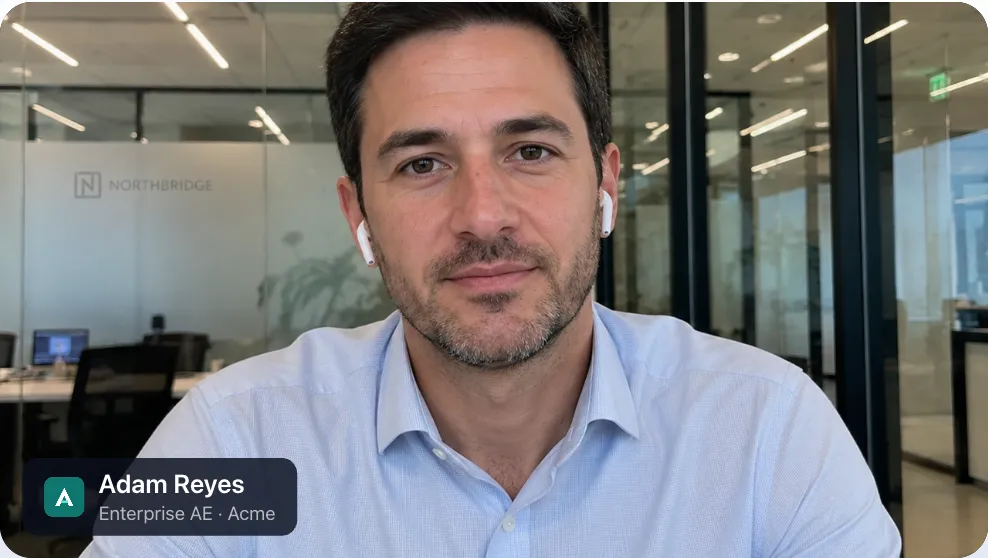
Then a rep joins a call with your biggest prospect, and what shows up is a face, a ceiling, and a display name that says MacBook Pro (2).
For most companies, video calls are now where customers, candidates and partners meet the company most often. Teams that sell, support, recruit and advise spend much of their day on camera. And the brand, which so much care went into, stops at the edge of the video tile.
The touchpoint nobody owns
Ask who owns how the company looks on video calls and you’ll usually get three answers, none of them “me”.
- Brand owns the logo and the guidelines, but not the meeting apps.
- IT owns Zoom, Teams and the laptops, but not what people look like on them.
- Sales, success and recruiting own the calls, but they’re measured on outcomes, not on consistency.
So everyone improvises. One rep has a virtual background with a logo from two rebrands ago. Another has a blurred kitchen. A third has typed their title into their display name, a fourth hasn’t, and the prospect’s side of the call is left to work out who does what from the order people speak in.
None of this is anyone’s fault. There was never a system for it, the way there is for every other surface the brand appears on.
What it costs
The costs are small on any one call and large across a year.
Time. Calls with several people on each side open with a round of introductions that exists because nobody can see who anyone is. That’s a few minutes of every multi-party call, spent on information that could have been on screen before anyone spoke.
Credibility. First impressions form in seconds. A team that shows up with consistent names, titles and branding looks like a team that has its act together. One that shows up as an assortment of webcams looks smaller than it is.
Consistency. You can’t run a rebrand, a product launch or a seasonal campaign on video if every person controls their own background. Each change becomes an all-hands email and a hope.
Clarity for the other side. Customers shouldn’t have to keep track of which of your five attendees is the solutions engineer. Candidates shouldn’t have to guess who on the panel is the hiring manager.
What a brand system for video looks like
Treat video calls the way you already treat email signatures: something people use every day, generated from data you already have, and governed centrally without being policed by hand.
In practice that means four things.
- Every person carries their name, title and company on their video. Not in the tile label, which is small, depends on the app, and disappears in screen-share layouts. On the video itself, where it travels with the person into every view and every recording.
- The values come from the directory, not from memory. Titles change. People move teams. If the source of truth is your identity provider, the tag stays correct without anyone remembering to update it.
- The brand team decides what’s fixed and what’s personal. The logo and colors are locked. People can still fix how their own name is spelled. Executives get a stricter template than the sales floor.
- It works in every meeting app. Your people use Zoom with one customer, Teams with another and Google Meet with a third. A brand standard that holds in one of them isn’t a standard.
How Nametags does it
This is the problem we built Nametags to solve. It started as an internal tool, because our own sales calls looked nothing like our brand.
Each person’s name, title and your approved brand are drawn onto their video on their own device. The desktop app appears as a camera called Nametags in any app that lets you choose a camera, and there’s also a native Zoom app.
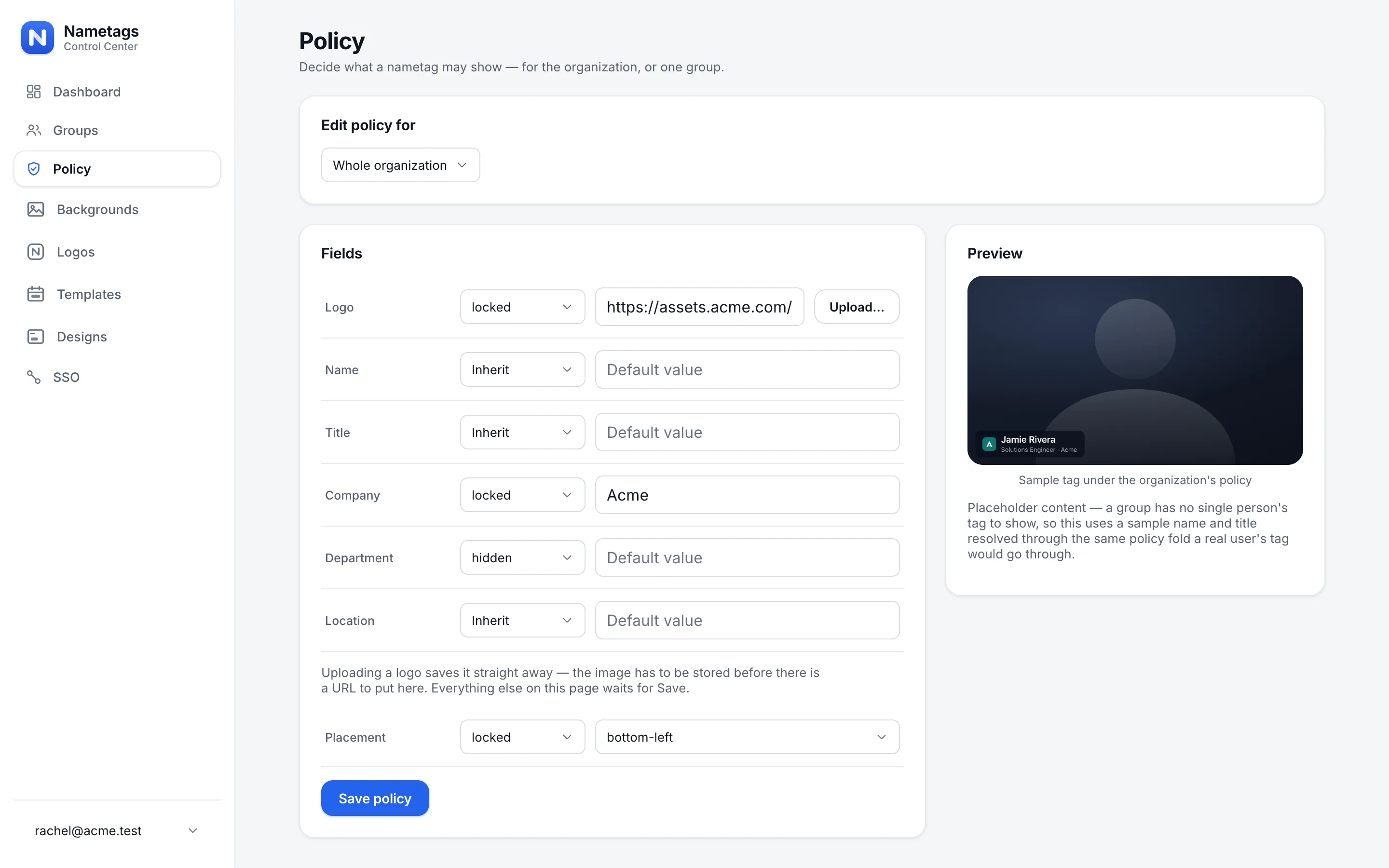
Brand and IT teams run it from one admin console, the Control Center, where they:
- set policy field by field: editable, locked or hidden, for the whole company or more strictly for a group,
- keep a library of approved logos and backgrounds,
- schedule templates for launches, conference weeks and the holidays, which start and end on their own,
- fill in titles and departments from your identity provider with SSO field mapping,
- and see adoption on the dashboard, so it’s a number rather than a guess.
Nametags never joins the meeting and never sees the video, which keeps the security review short.
Where to start
You don’t need to roll anything out to see the gap. Take screenshots of the next ten external calls your company runs, and put them side by side with your homepage. If they look like two different companies, that’s the gap.
When you’re ready to close it, start with the team that spends the most time on camera, usually sales. We wrote up how to run a 30-day pilot with one team, and if you need to get budget for it, this page makes the case for you.
'%3e%3cpath%20d='M104%20196h92l-12%2056h-68z'%20fill='%23fff'/%3e%3cpath%20d='M96%20184h108v14H96z'%20fill='%23fff'/%3e%3cpath%20d='M150%20184c-2-30%202-58%200-96'/%3e%3cpath%20d='M150%20150c-30%202-44-14-46-34%2022-2%2042%2012%2046%2034z'%20fill='%23fff'/%3e%3cpath%20d='M151%20118c26%200%2040-16%2042-36-22%200-38%2014-42%2036z'%20fill='%23fff'/%3e%3cpath%20d='M150%2088c-6-10-4-22%200-30%206%208%206%2020%200%2030z'%20fill='%230a0f1c'/%3e%3c/g%3e%3c/svg%3e)
'%3e%3crect%20x='62'%20y='92'%20width='176'%20height='116'%20rx='8'%20fill='%23fff'/%3e%3cpath%20d='M40%20216h220l-14%2018H54z'%20fill='%23fff'/%3e%3cpath%20d='M174%20150a24%2024%200%201%201-8-18'%20/%3e%3cpath%20d='M166%20116l1%2017-17%201'%20/%3e%3cpath%20d='M206%2062c-2-16%2022-20%2026-6%204-14%2030-10%2028%206%2012%200%2014%2018%200%2018h-52c-14%200-14-18-2-18z'%20stroke-width='5'%20stroke-dasharray='2%2010'/%3e%3c/g%3e%3c/svg%3e)
'%3e%3crect%20x='46'%20y='72'%20width='208'%20height='156'%20rx='14'%20fill='%23fff'/%3e%3cpath%20d='M46%20122V86a14%2014%200%200%201%2014-14h180a14%2014%200%200%201%2014%2014v36z'%20fill='%230a0f1c'/%3e%3cpath%20d='M112%2097h76'%20stroke='%23fff'%20stroke-width='7'/%3e%3cpath%20d='M78%20186c8-26%2016-32%2018-20s-10%2030-4%2028%2014-34%2022-30-6%2026%202%2024%2012-20%2020-18%200%2016%208%2014%2018-14%2034-12'%20stroke-width='6'/%3e%3cpath%20d='M78%20206h144'%20stroke-width='4'/%3e%3crect%20x='46'%20y='72'%20width='208'%20height='156'%20rx='14'/%3e%3c/g%3e%3c/svg%3e)